


Little Caesars
4.771.44K Reviews
App Specs
- Version
- 26.11.0
- Updated On
- License
- Free
- Downloads
- 10,000,000+
- Developer
- Little Caesar Enterprises, Inc.
- Categories
- Food & Drink
- Platform
- Android, iOS
Screenshots
 Analysis by AppCompare
I see the Little Caesars app as a practical choice when I already know I want Little Caesars and would rather arrange the order on my phone than call or decide at the counter. It is a free Food & Drink app from Little Caesar Enterprises, Inc., and its focus is ordering from that restaurant rather than comparing pizza places. That distinction matters: it can make a familiar purchase easier, but it is not a general food-delivery guide.
What I would decide before downloading
My first question is how often I order from this chain and whether pickup suits my routine. If I tend to repeat a familiar order, keeping the app around can save a few steps; if I only want pizza occasionally or usually choose whichever nearby restaurant has the best fit, a broader restaurant or delivery app may be more useful. The app’s strongest case is not that it changes what pizza is, but that it puts ordering and pickup arrangements in one place.
I would also think about how much customization I actually need. Adjusting an order is useful when I have a specific preference, but it is worth checking each selection carefully before placing it rather than assuming the app will interpret a vague request the way I would. For a straightforward order, the digital route can feel efficient. For a complicated request that needs a conversation, speaking to the restaurant may be the more comfortable option.
Why a regular pickup order can feel easier
The appeal becomes clearest on an ordinary busy evening. I can decide what everyone wants before leaving home, choose the restaurant and pickup approach, then head over when the order is ready instead of working out the details at the counter. That is especially handy when I am coordinating dinner around a commute or collecting food for more than one person. The app helps organize the purchase; it does not remove the need to choose a location and make sure the order suits the people eating.
For an occasional customer, the menu can also be a useful way to review the familiar options before committing. I would use that pause to check the whole basket, especially when adding sides or changing a topping, because a quick tap can make it easy to overlook a detail. Reordering is more convenient when the saved order still matches what I want today; it is less helpful if I routinely change the order or am buying for a different group.
There is a practical trade-off in relying on a restaurant’s own app. It keeps the task focused on Little Caesars, which can be simpler than searching a broad catalog, but it cannot help me compare menus across competing pizza shops in the same way a multi-restaurant service can. If my priority is a specific chain and a familiar pickup routine, that focus is an advantage. If my priority is discovering alternatives, the narrower scope is a real limitation rather than a flaw to work around.
Simplifying Your Pizza Cravings
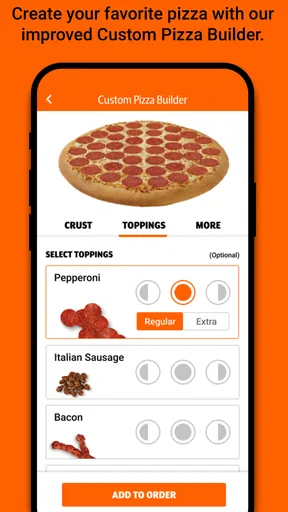
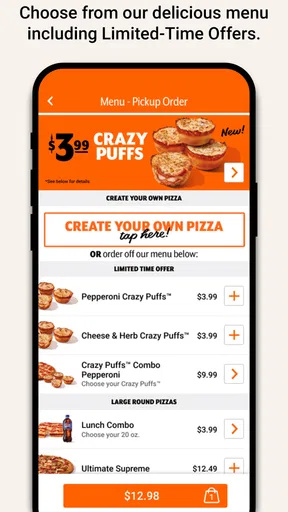
The first thing you'll notice about the Little Caesars app is its user-friendly interface. The design is clean and straightforward, making it easy for anyone to navigate. As soon as you open the app, you're greeted with the menu, featuring all your favorites from classic pepperoni to their famous Crazy Bread. The best part? You can customize your order to your heart’s content. Want extra cheese or light sauce? No problem. The app allows you to tweak your order just the way you like it.
Worth Reading Before You Choose

EA SPORTS FC Mobile 26 Is a Bigger Football Game, but It Takes Time

Flipboard Shows What News Apps Must Do Beyond the Feed

Switching to Android Auto Means Rethinking Your Driving Routine

Google Calendar Makes a Crowded Week Easier to Manage

Ludo King Makes the Most of the Minutes Between Plans

Baby Panda World Brings Quick Play to Modern Phones, but Its Game Library Feels Busy
Features You’ll Love
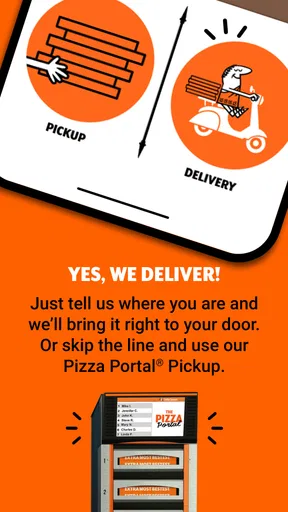
One of the standout features of this app is the Pizza Portal Pickup. It’s a game-changer, allowing you to skip the line and grab your pizza from a heated compartment in the store. Just walk in, enter your code, and boom—you're out with a hot pizza in hand. No more waiting around, which is perfect for those busy nights when every minute counts.
In practice, I would treat that pickup option as a way to make collection more predictable, not as a promise that every visit will take exactly the same amount of time. Before setting off, I would check the order status and keep the pickup code available on my phone. At the store, I would follow the app’s directions and make sure I am at the right location; a pickup process only saves effort when the order and restaurant match. This small bit of preparation is particularly useful if I am collecting dinner while juggling bags, children, or a tight schedule.
The app also keeps track of your previous orders, making reordering a breeze. Plus, you can save multiple addresses, so whether you’re at home, work, or a friend's place, getting your pizza fix is effortless.
Those conveniences work best when I use them deliberately. I would review a previous order before repeating it, since a saved choice is a shortcut, not a substitute for checking toppings, sides, and the destination. Multiple addresses are helpful when my pickup plans vary, but they also make it sensible to confirm which location or address is active before I place an order. That check can prevent the frustrating mistake of arranging dinner around the wrong destination.
Why You Should Give It a Try
Now, I know what you're thinking: "Do I really need another app on my phone?" Trust me, if you're a pizza lover, this one is worth the download. Besides making ordering super fast, it sometimes offers exclusive deals that you won’t find elsewhere. Who doesn’t love a good bargain?
I would compare any offer with the order I actually intend to place, rather than building dinner around a deal that adds items I did not want. Promotions can make the direct ordering route more appealing, but they are only valuable when the included choices fit my plans. For someone who orders from the chain now and then, checking the app before paying can be worthwhile; for someone who mostly shops by comparing several restaurants, a wider service may make that comparison easier.
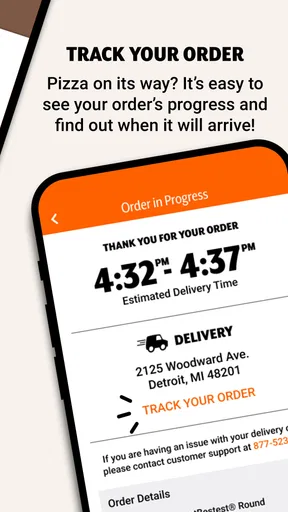
And let’s not forget the app’s real-time updates. You’ll get notifications about the status of your order, from when it’s being prepared to when it’s ready for pickup. It’s like having a pizza concierge right on your phone.
Those updates are most useful as a planning aid: they help me decide when to leave or when to get ready to collect, while the pickup instructions tell me what to do once I arrive. I would still pay attention to the current order status instead of assuming that an earlier estimate remains accurate. If notifications are not convenient, checking the order in the app before heading out is a sensible habit, especially when timing matters.
The app is best suited to people who already like Little Caesars, order often enough to benefit from saved choices, and are comfortable picking up their food. It may be a poor fit if I want delivery options from many restaurants, prefer to compare local menus before choosing, or need to discuss an unusual order face to face. It also will not make the food itself a better match for someone who simply does not enjoy the chain’s menu. In those cases, choosing another restaurant or ordering in person is the more direct answer.
For an occasional user, the main cost is the small effort of installing and learning another restaurant app. I would keep it only if repeat ordering, pickup instructions, or offers make that effort worthwhile. Little Caesars has an average rating of 4.7 from around 566,000 ratings, and it has been installed over 10 million times. It is free, rated for Everyone, and version 25.24.0 requires Android 9 or later. The app was released on September 16, 2016, so it is an established option rather than a new experiment, though those figures alone cannot tell me whether its ordering flow suits my own habits.
All in all, the Little Caesars app is a must-have for anyone who enjoys convenience and delicious pizza. Whether you're a regular customer or just looking to try something new, this app makes the experience as easy as pie—pizza pie, that is.
So go ahead, give it a shot. Your taste buds will thank you.
Pros
- Easy to navigate interface.
- Quick pizza customization options.
- Efficient order tracking system.
- Attractive deals and discounts.
- Secure payment processing.
Cons
- Limited menu variety for dietary needs.
- Occasional app crashes reported.
- Inconsistent delivery times.
- Push notifications can be frequent.
- No option for table reservations.
FAQs for Little Caesars
What features does the Little Caesars app offer?
The Little Caesars app provides a convenient platform for ordering pizza directly from your smartphone. Key features include a user-friendly interface, the ability to customize orders, access to exclusive deals and promotions, real-time order tracking, and a store locator. Additionally, the app supports secure payment options, making it easy to complete your purchase.
Is the Little Caesars app free to download and use?
Yes, the Little Caesars app is free to download on both Android and iOS devices. While the app itself doesn’t cost anything, keep in mind that you will be charged for any food orders you place through the app. There are no hidden fees for using the app’s features.
How do I track my order using the Little Caesars app?
After placing an order on the Little Caesars app, you can track its progress through the order tracking feature. The app provides real-time updates, allowing you to see when your pizza is being prepared, when it’s ready, and when it’s out for delivery or available for pickup. This feature ensures you stay informed throughout the process.
Can I customize my pizza order through the app?
Absolutely! The Little Caesars app allows users to fully customize their pizza orders. You can choose from various crust types and add a variety of toppings to suit your preferences. The app’s intuitive design makes it easy to create the perfect pizza to match your taste.
Are there any exclusive deals available on the Little Caesars app?
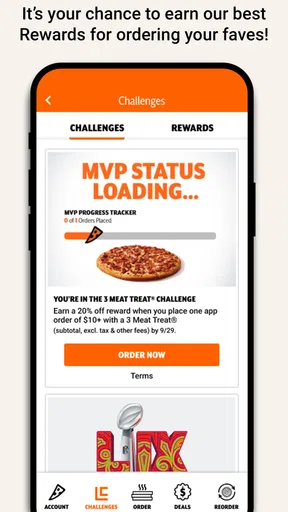
Yes, the Little Caesars app often features exclusive deals and promotions that are not available elsewhere. By using the app, you can access special discounts, limited-time offers, and loyalty rewards. It's a great way to save money while enjoying your favorite pizzas.


